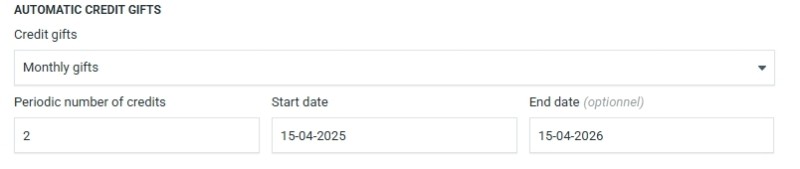
It’s recommended to set the Start date to a future date, today’s background job may have already run.
The End date is optional — if left blank, automatic credit gifts will continue indefinitely.
How it works
A background job runs daily, checking all configured customer accounts. If a gift is due on that day, it will:
- Add the credits to the customer’s balance
- Send a notification email to the customer
- (A copy of the email is sent to your Billing email address)
Customizing the email notification
The email that is sent when credits are gifted can be fully customized. You’ll find the template under Mail → Mail templates, named “Automatic credits notification.”
This template supports the following tokens:
-
{site:company} — the name of your company or platform
-
{amount} — the number of credits gifted
-
{period} — the selected interval (e.g., “week”, “month”, or “year”)
-
{next} — the date of the next scheduled gift
These tokens will automatically be replaced when the email is sent. You can freely update the wording or layout to match your brand voice or add extra context for your customers.
Rules & logic
- No retroactive gifting
Credits are never added for past dates. If the start date is in the past, the system will calculate the next valid date based on the start date and the selected frequency.
- Month handling without overflow
For example: if the start date is January 31st, the next monthly gifts will occur on February 28th, March 28th, etc. The system avoids shifting to the 1st of the following month.
- Changing the configuration
- Updating the start date only has an effect if the new date lies in the future. In which case the next scheduled gift gets reset and will be on that date.
- Changing the frequency (e.g., from monthly to weekly) takes effect after the next scheduled gift.
- Gifts are never sent before the start date or after the end date (if one is set).